Followers

Showing posts with label Heat Transfer Vinyl. Show all posts

Saturday, March 15, 2014

Disney Attire 2014

Long time no post do accept my apologies. Sometimes life just gets in the way of all the fun I would like to have. Anyway, here are some things that I have been working on in preparation for our next Disney Vacation. This time we are trying our luck on the high seas onboard the Disney Wonder. The kids are extremely excited and the countdown began over 160 days ago. My husband surprised me with the new Cricut Explore machine and it has awakened my love for crafting again. The software is completely user friendly and I am delighted to say that I am once again staying up into the wee hours of the morning crafting away. Yet its so quiet, that I am not disturbing anyone *smile*.

Take a look at my creations and do leave a comment letting me know you stopped by.

Have a wonderful Saturday and weekend!

Sharondalyn
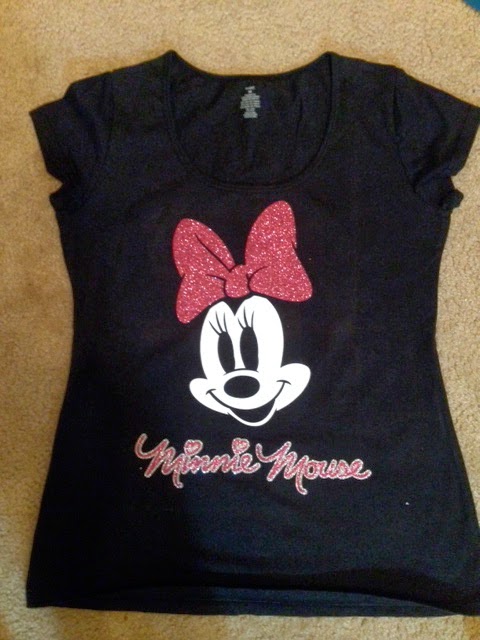
Everything was cut using the new Cricut Explore machine, Design Space software, Disney Licensed Images and Heat Transfer Vinyl.

Thanks for looking, Enjoy.

Friday, July 12, 2013

Achors Aweigh~Vacation Tee shirts using heat transfer vinyl and cricut cartridge pack your bags.

Hello Everyone Happy Friday! My family and I are about to set sail for the caribbean so I decided to make some vacation tee shirts for us to wear on embarkation day. First, I tie dyed the shirts which took at minimum three days to complete. Then, I picked the design using my gypsy and cut everything out using my expression 2. Since I enjoy using heat transfer/tee shirt vinyl so much, I decided that I NEED a heat press. Having one will make it so much easier to iron larger images.

Thanks for stopping by my blog today and have a wonderful weekend. Don't forget to leave wonderful comments for me to read.

Sincerely, Sharondalyn

Materials

Heat Transfer/Tee shirt vinyl

Cricut Expression 2 machine

Cricut cartridge "Pack Your Bags

Tie dying kit, urea crystals, soda ash, rubber bands, gloves

This is my husbands shirt

The Kids shirt

My shirt and unfortunately it suffered a mishap that I don't have time to get creative with

Sunday, June 16, 2013

Happy Fathers Day~Super Dad Tee Shirt

Happy Fathers Day to all of the wonderful fathers in blog land including my husband. Today I wanted to share with you all the fathers day tee shirt I designed for him to wear with the help of the kids. I used the cricut cartridge "Fathers Day", for the image. The my son wrote something special on this shirt using tulip fabric markers. My daughter decided to design her own shirt which will be revealed later.

Thanks for stopping by and have a wonderful holiday!

Materials

Cricut cartridge "Fathers Day"

Heat Transfer Vinyl

Tulip fabric markers

Thursday, February 14, 2013

"Be Mines" ~ Valentines Day Tee Shirt

Happy Valentines Day Everyone. I am a sucker for a holiday especially the ones that allow me to show off my creativity. My daughter asked me to buy her a tee-shirt to wear on Valentines day in traditional Valentines day colors. So as I browsed the stores I did not find anything suitable so guess what I decided to do? Yep you guessed correct, design her a shirt using my trusty cricut machine.

I picked up a white Hanes tee-shirt from the girls department in Wal-mart then proceeded to the fabric department to pick up something cute and festive for the occassion. They didn't have a huge selection but what they did have was perfect. If you have never worked with fabric and your cricut machine it is so easy to do. The results are amazing and guaranteed to WOW everyone.

Here is a mini tutorial of how to cut fabric using the cricut machine. First, purchase heat~n~bond in the red package and measure it to fit the piece of fabric you plan on cutting. Once you have measured it then follow the instructions on the packaging for ironing it onto the fabric. Basically, use the highest setting without steam and place the paper side up. Leave the iron on each section for about 6 seconds. Allow to cool before peeling off the backing. Next, place the fabric on your cutting mat and use the following settings on your machine, speed 3, pressure 4 and blade 4. The settings will vary depending on the weight of fabric you are cutting. Once you have cut your image then place it on the garment and just iron it on again without using any steam.

The results are nothing short of amazing if I must say so myself. On my project, I also used heat transfer vinyl. This too is extremely easy to use and very addicting.

The heart with wings came from the Hello Kitty greetings cartridge and the "Be Mines" came from Sesame Street and Friends cartridge.

Thanks for stopping by and commenting on my blog. Have a wonderful Valentines day.

Tuesday, October 23, 2012

"Trick or Treat" Tee-shirt

Good evening, Today I decided to stay home from working the book fair at the kids school and do some crafting. Guess what I played with today? Yep you guessed it tee-shirt/iron on vinyl. I have been wanting to design the kids some tee-shirts to wear during this Halloween season before it was over. Finally got them done today. One word describes how I feel about how the shirts turned out "Fantastic"! Thanks for looking bloggers and do leave a kind word or two. Sharondalyn
Supplies: Hello Kitty Greetings Cricut Cartridge Mini Monsters Cricut Cartridge Glow in the dark heat transfer vinyl (hello kitty face) Black, lime green, blue, and orange heat transfer vinyl Gypsy Cricut Expression die cut machine Tee-shirt (dollar tree).

Tuesday, August 7, 2012

Nifty at?

Here is another project that I completed over the weekend while my mom was visiting. I hate to admit it but I am tired of crafting, at least for the next 15 minutes, LOL!! Anyway, it is for my aunt who turned 78 August 4. In my opinion, it is better to receive a present late than never. I love my aunt to pieces. Hope she enjoys wearing this tee shirt. 3 bird's life's a party is the cartridge of choice for this project. It has such cute phrases and projects for birthdays. Thanks for looking, Sharondalyn

I'm not 60!!

My mom came to visit me this past weekend and boy did the cricut have a workout! We played with vinyl until we ran out of vinyl. I am getting ready to place another order with expressions vinyl as I type. Anyway, she wanted me to personalize a tee-shirt for her cousin's 60th birthday. I used heat transfer vinyl with I purchased from www.expressionsvinyl.com. Great people to do business with, fast shipping too!! The cricut cartridges I used were craft room basics (it is loaded onto my gypsy), and Jubilee (oldie but goodie). The settings I used was 3-6-3 works great every time. The tee-shirt game from walmart $3.43. Ok followers, tell me what you think and thanks for looking. Sharondalyn

Thursday, July 26, 2012

Baseball Shirts

I decided to try my hand at heat transfer vinyl. It is so super easy to use. I purchase all of my vinyl from www.expressionsvinyl.com. They have such good prices on HTV and a great selection to choose from. I designed the images using my gypsy and cut them using my cricut. Then I pealed the access vinyl away from the image and used my iron to transfer onto my tee shirt. The settings I used to cut the vinyl on my cricut 3-6-3. It works for me. I tried 3-3-3 but the images were way too difficult to remove from the sheet. So without farther adue, here is my project..